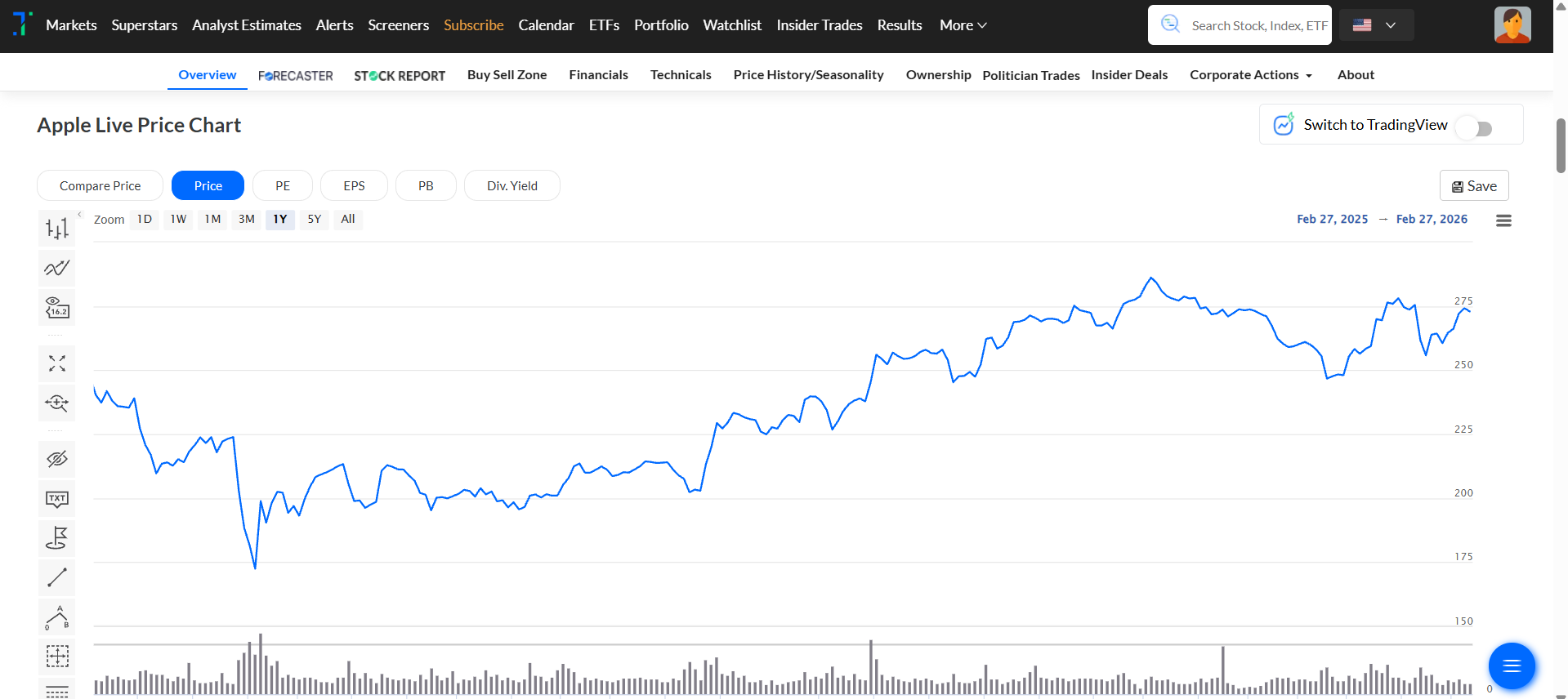
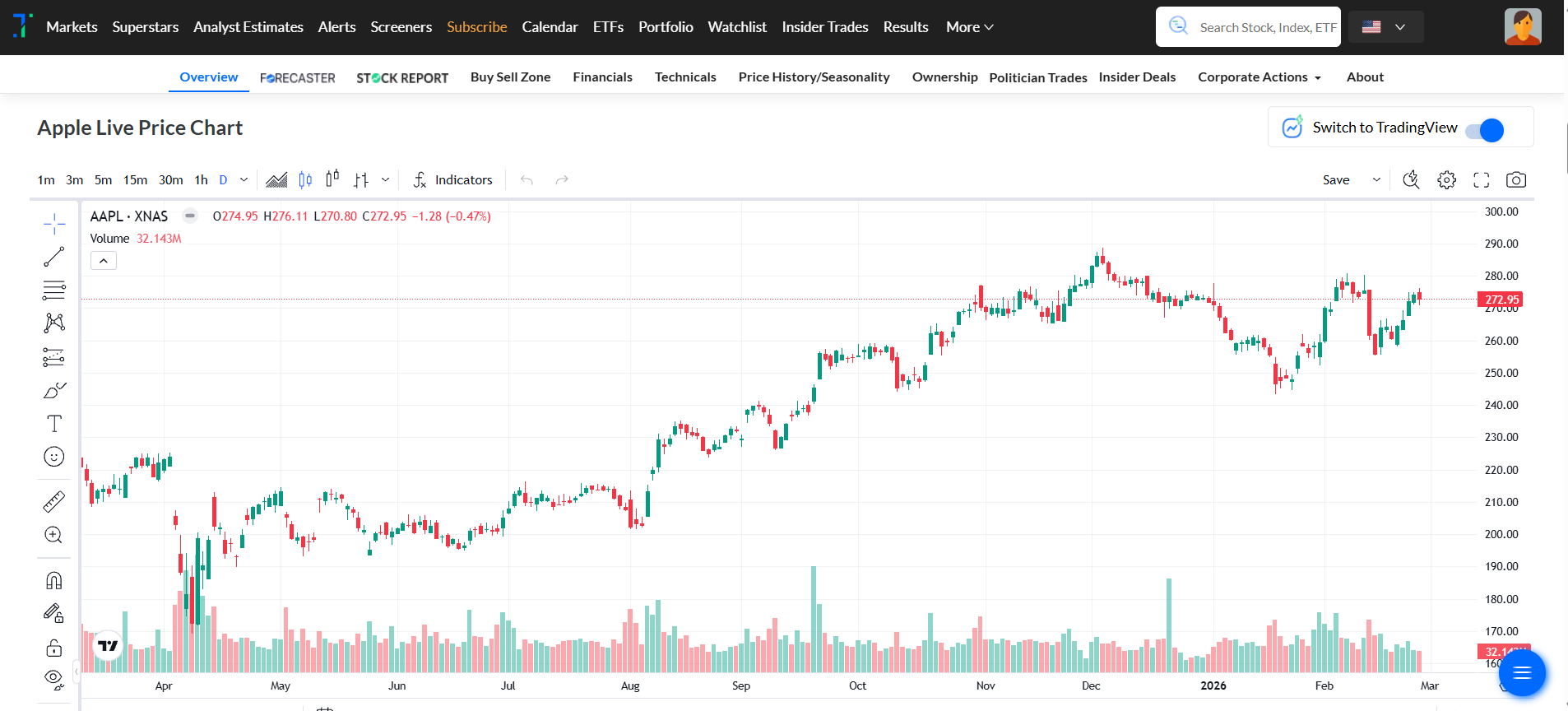
Individual Superstar alerts
Follow your favorite superstar, and never miss their next move. You can now set instant alerts for individual or institutional superstars so you follow just your preferred investors.
How to set it up:
You can manage your Individual Superstar Alerts in three ways:
1. From the Superstar portfolio section.
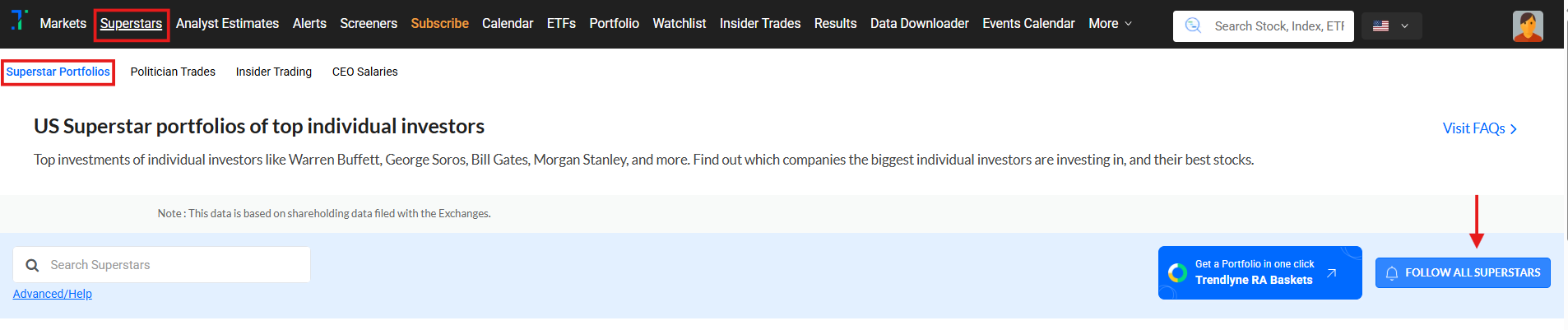
a) Click on Follow All Superstar Alerts, then select Individual Superstar Alerts.
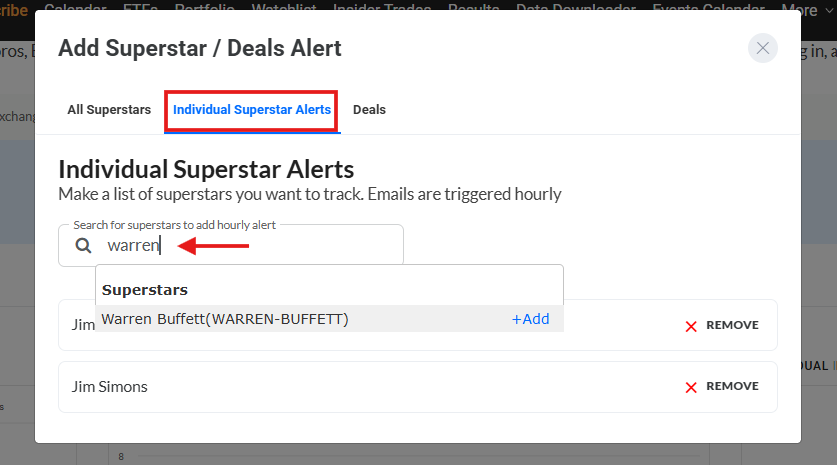
b) Use the search bar to find superstars and click +Add to include them in your alerts list.
2. From the Superstar Portfolio table.
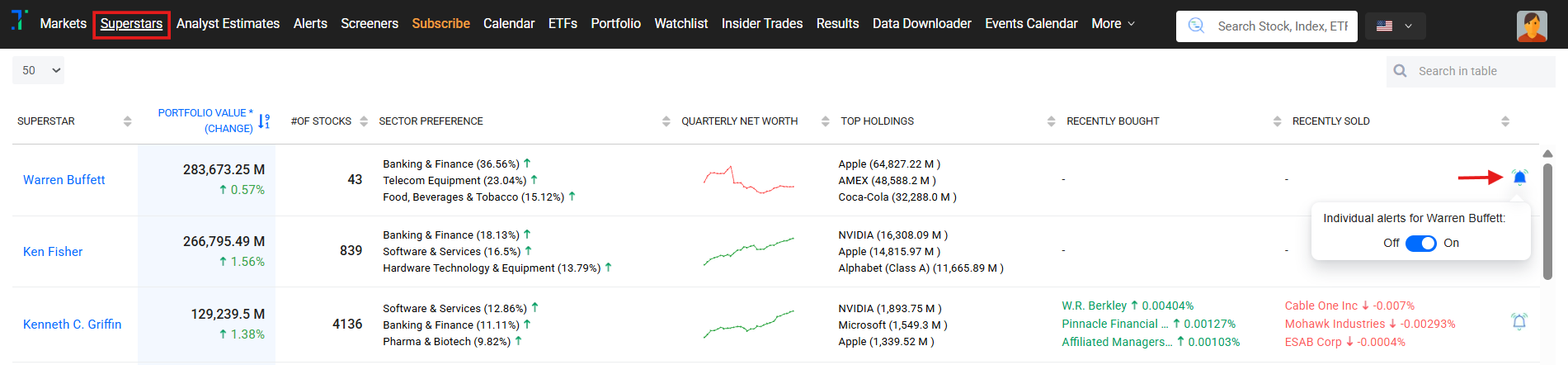
a) Click the Bell icon in the last column of the table.
b) Use the toggle to enable or disable alerts for each superstar, as shown in the image below.
B. From an Individual superstar page
Click Follow Individual Alert, and use the toggle to enable or disable alerts for that superstar (for example, Warren Buffett’s portfolio).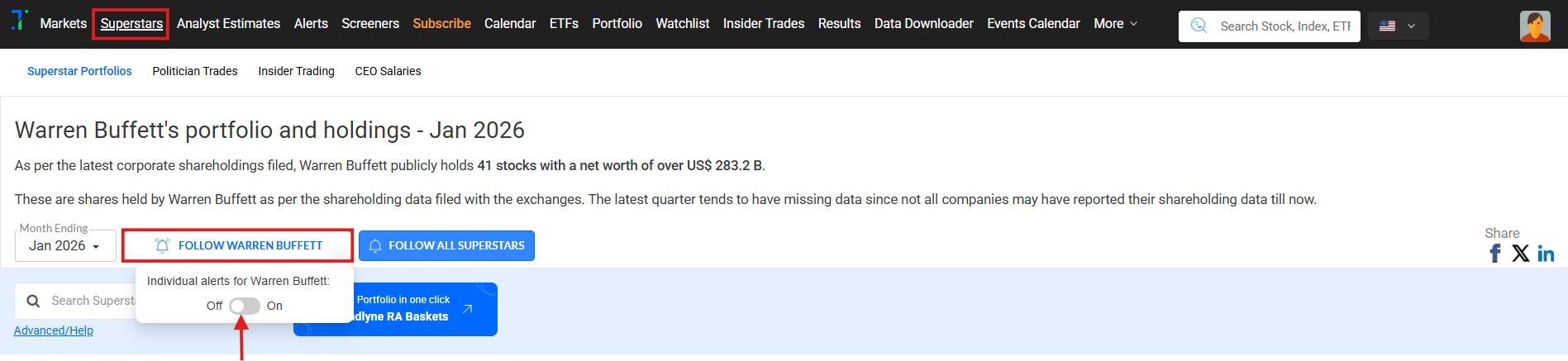
------------------------------------------------------------------------------------------------------------------------------------------
Screener: Easy mode
Discover great stocks in seconds! No complex setup needed. Our new Easy Mode Screener lets you easily filter using fundamental, technical, and comparative parameters in drop down mode, all in one screen.
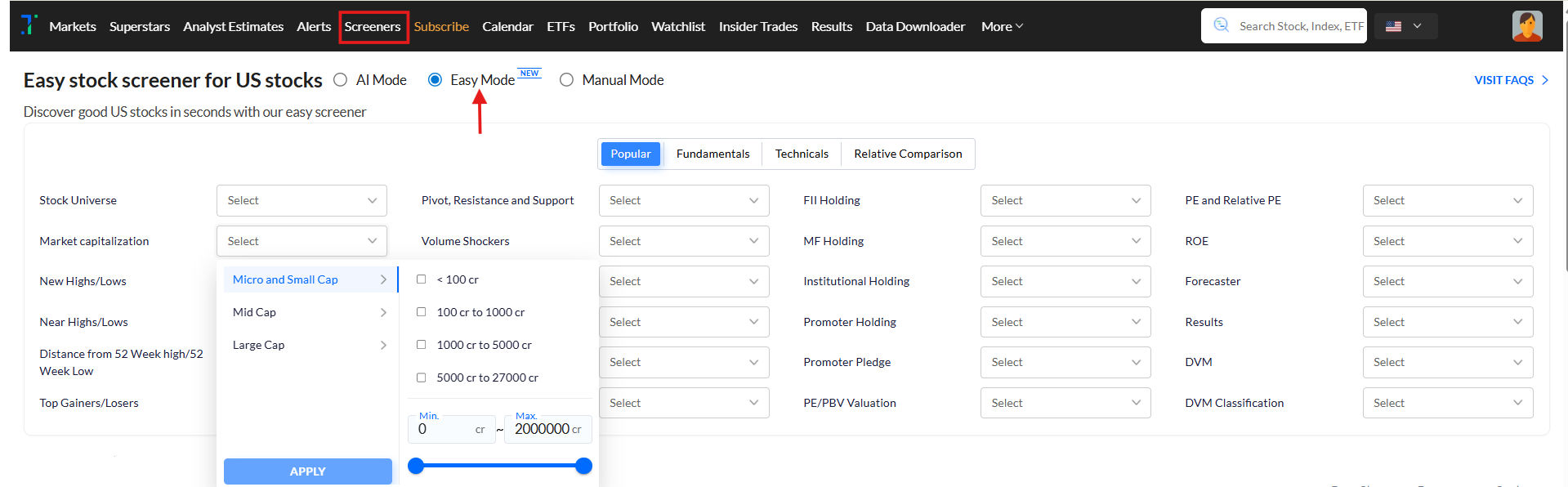
You can access the Screener Easy Mode using this link: https://us.trendlyne.com/us/fundamentals/easy-stock-screener/popular/
------------------------------------------------------------------------------------------------------------------------------------------
Follow trades by US politicians
Curious what US lawmakers are buying and selling? Trendlyne’s Politician trades feature lets you follow stock trades by political pros like Nancy Pelosi, Tommy Tuberville, Josh Gottheimer, and more.
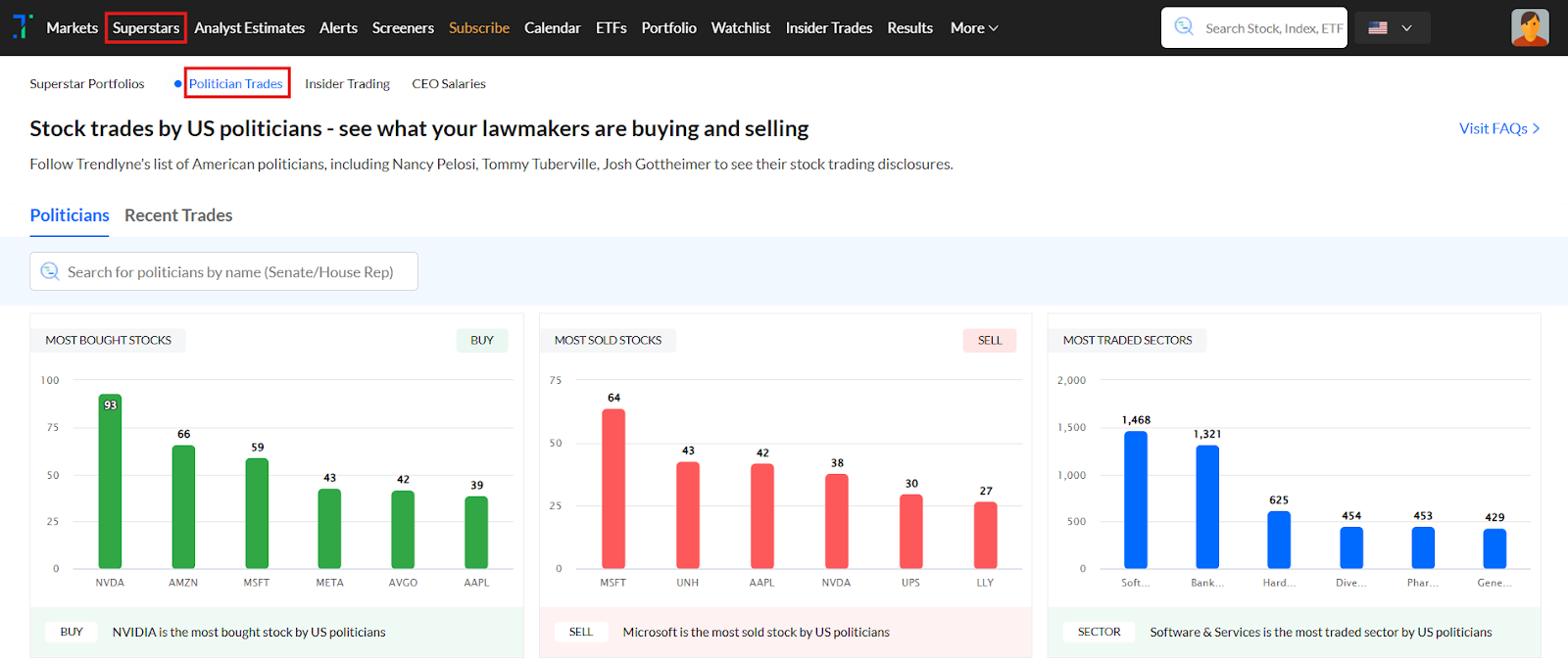
You can access the Politician Trades using the following link: https://us.trendlyne.com/us/politicians/dashboard/.
------------------------------------------------------------------------------------------------------------------------------------------
July 2025
Screeners with AI mode: You can now build screeners using plain English
Creating stock screeners has just become very easy with Screener AI Mode. This gives you an AI assistant who takes a query you type in plain English and converts it into a working screener.
For example, if you ask the AI for stocks with high ROE and low debt, it will automatically convert your question into a screener query and build the screener for you using the relevant parameters.
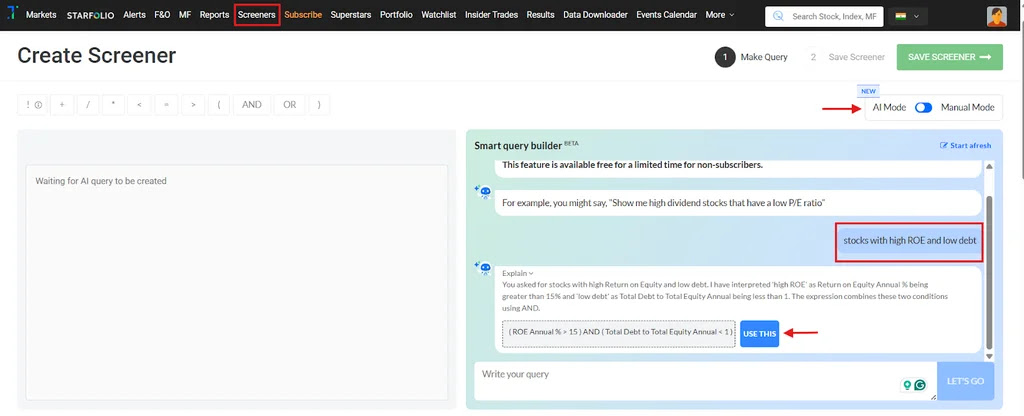
You can even paste queries from other platforms - the AI will automatically map them to a working Trendlyne query, using the correct metrics. You can also ask AI to edit any query according to your requirements.
You can access the AI Screener Mode by clicking ‘Create New Screener’ from the Screener section and enabling the AI Mode toggle.
------------------------------------------------------------------------------------------------------------------------------------------
Where are the bulls and bears?: Bullish Bearish Breadth for sectors, industries & indices
Bullish Bearish Breadth gives you insights into market participation across sectors, industries, and indices, with bullish and bearish breakups.
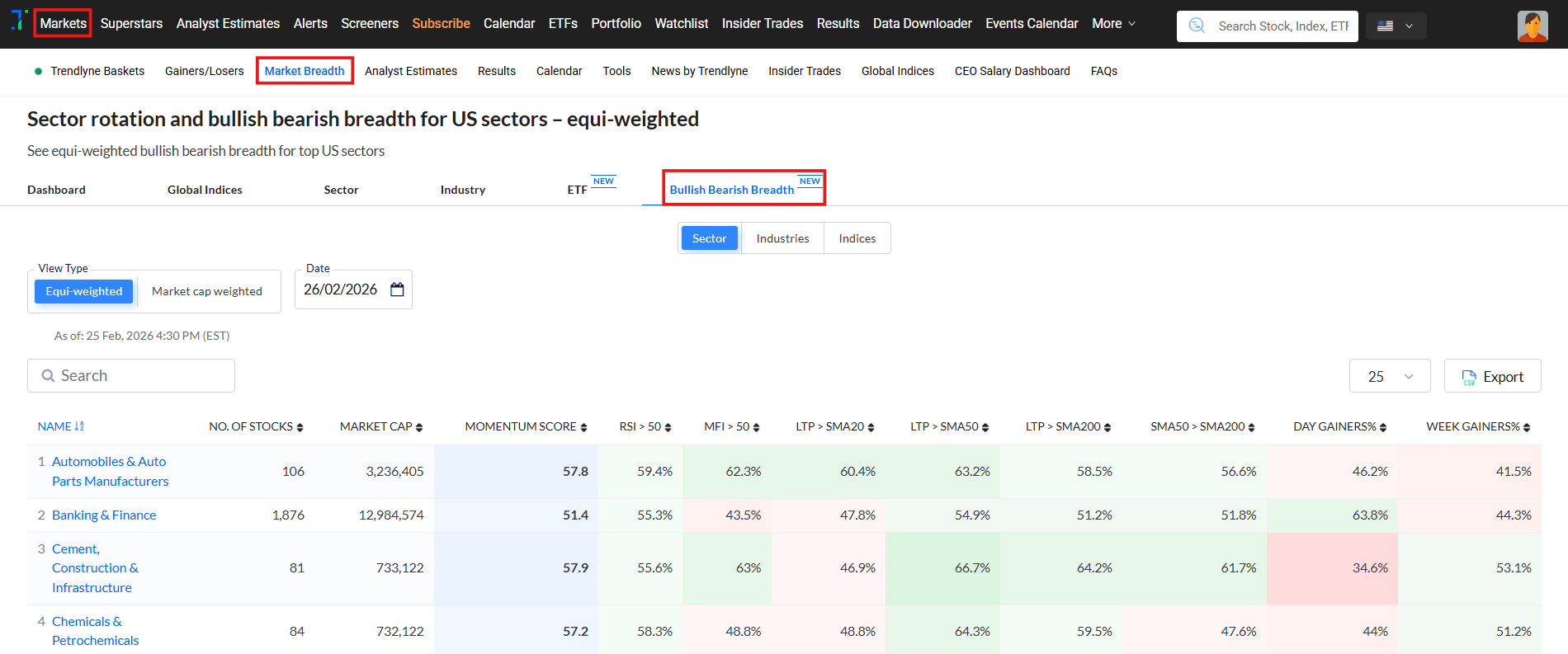
This has two view modes:
1. Equi-Weighted: Every stock has equal weight. This is great for identifying broad-based moves.
2. Market Cap-Weighted: This is the large-cap driven view, ideal for tracking institutional sentiment.
The table has metrics like the percentage of stocks with RSI > 50, MFI > 50, and those trading above SMA 20, 50, and 200, as well as those with SMA 50 > SMA 200.
It also shows the percentage of daily and weekly gainers vs. losers, making it easy to spot whether a sector's
movement is supported by many stocks or just a few.
You can go to Bullish Bearish Breadth via the Market Breadth under the Markets page, or directly here: https://us.trendlyne.com/us/equity/sector-bullish-bearish-breadth/equi-weighted/
------------------------------------------------------------------------------------------------------------------------------------------
Trendlyne’s Global iOS app
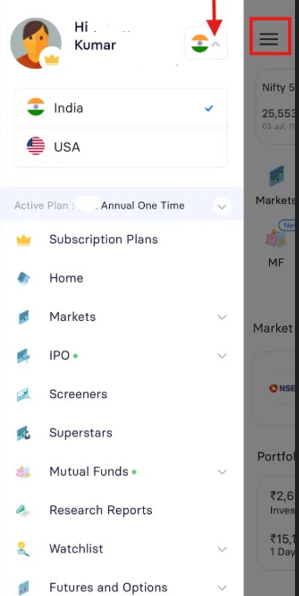
The Global iOS App is now live, giving users seamless access to both the Indian and US markets within a single app. This makes it easier than ever to track, analyze, and manage global investments on the go.
Switching between markets is simple, just tap the hamburger menu, then use the dropdown next to the flag icon to toggle between India and the US.
------------------------------------------------------------------------------------------------------------------------------------------
A full portfolio x-ray is here, with advanced features: Dividends, potential gain/loss, tax summary, and timeline.
We’ve rolled out several new portfolio tools to give investors better insights for both their US and Indian portfolios. These help you track dividends, understand potential gains and losses, and stay updated on key portfolio events.
The new Dividend Report provides a consolidated view of dividends received in the past year, along with upcoming dividend alerts. This helps ensure you don’t accidentally sell before the ex-dividend date.|
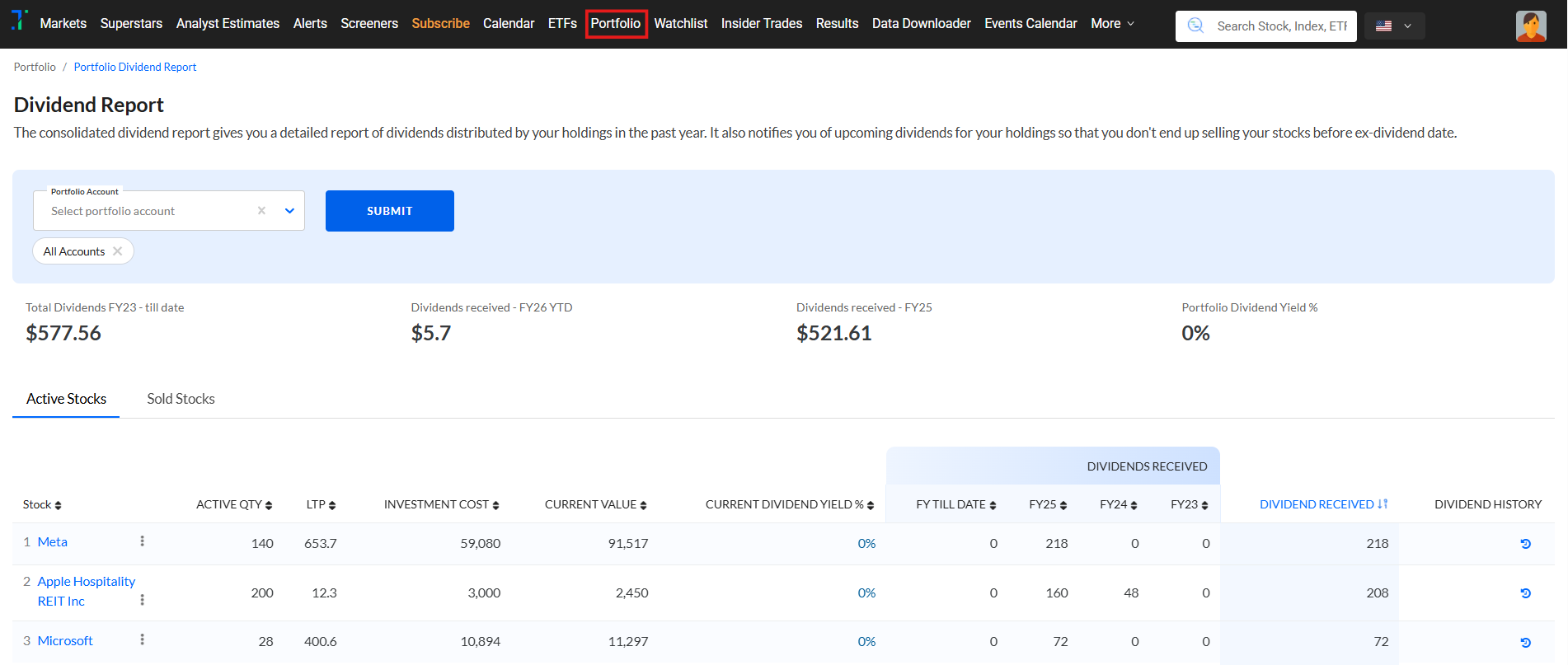
You can access the Dividend report using the following links:
US: https://us.trendlyne.com/portfolio/dividend-report/
India:
The Potential Gain and Loss Report highlights your portfolio’s missed opportunities by showing unrealized profits/losses based on stock highs and lows. It’s a great tool to assess where you could optimize your strategy.
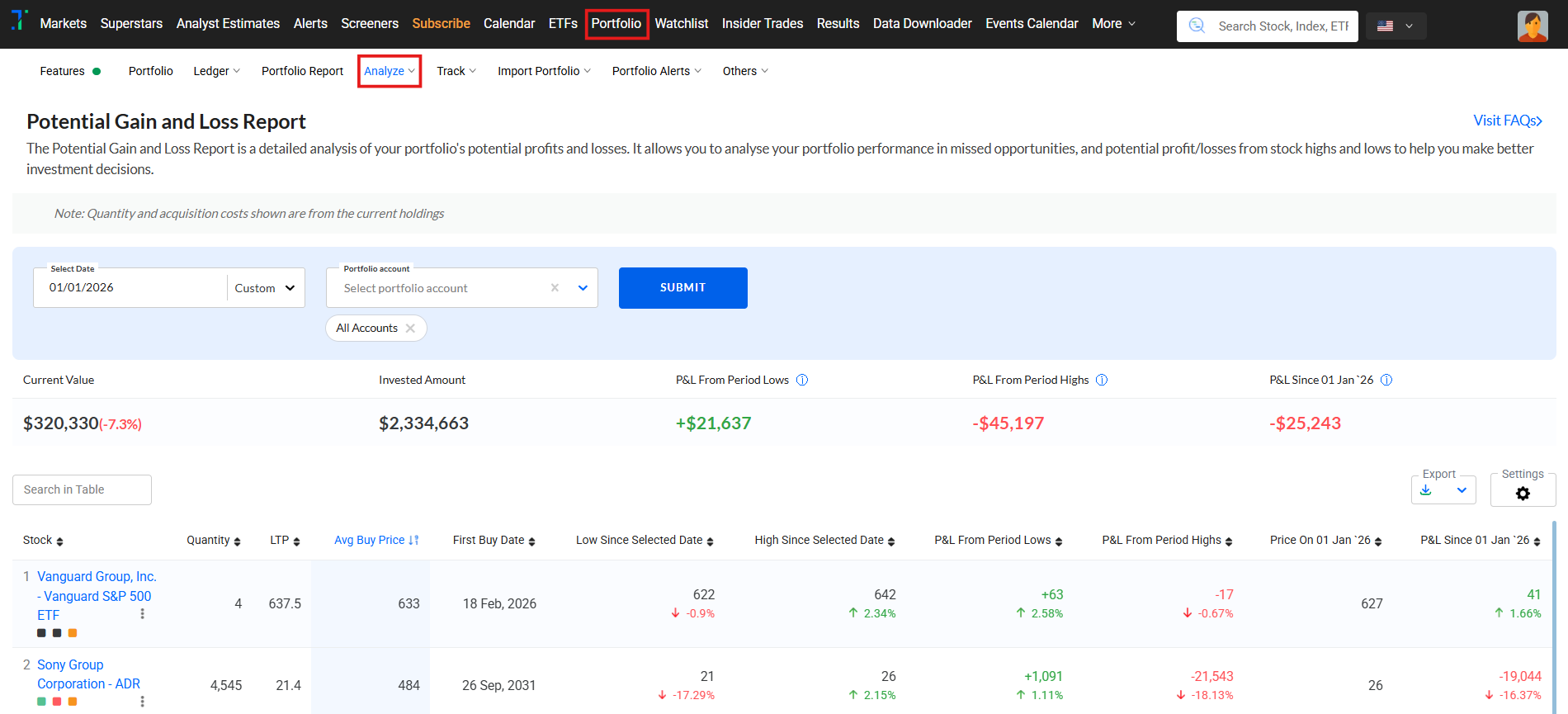
You can access the Potential Gain and Loss Report using the following links:
US:
India:
The Portfolio Timeline keeps you updated on stock-specific events, including corporate actions, annual reports, earnings calls, analyst updates, and more, all in one place.
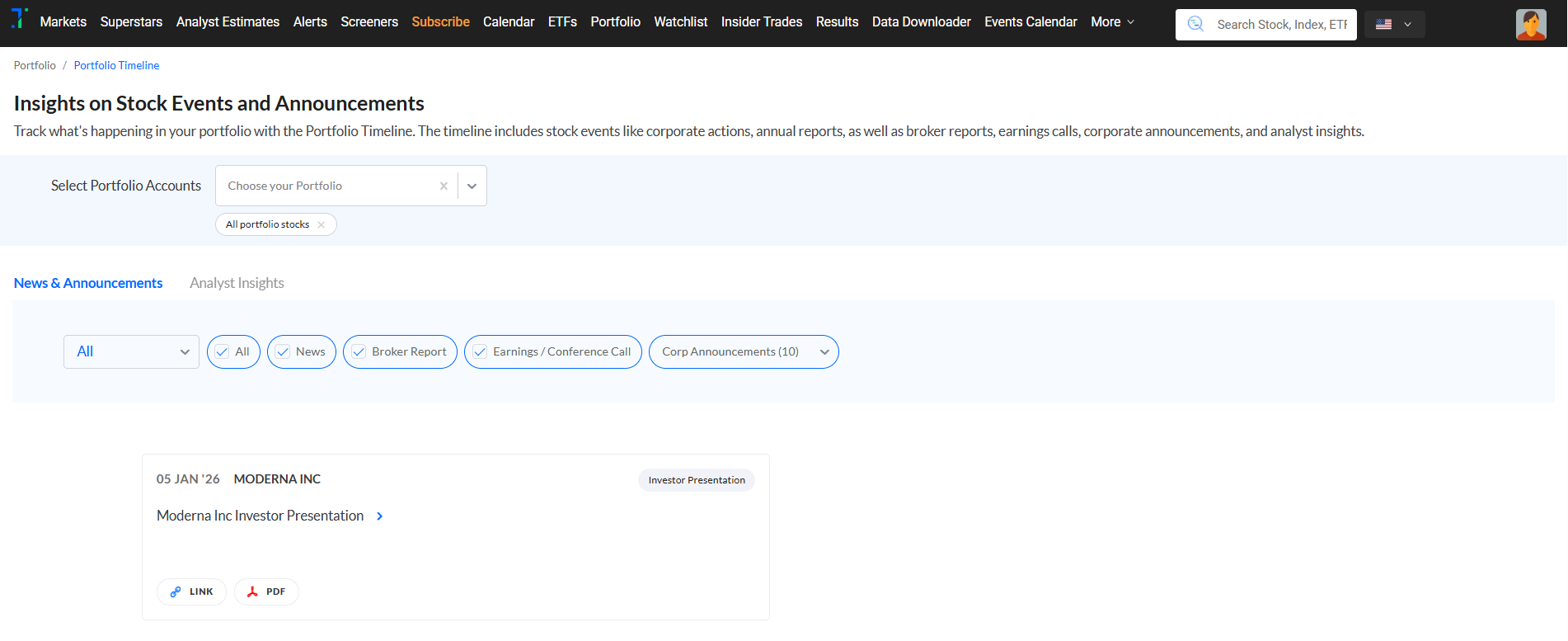 You can access the Portfolio Timeline using the following links:
US:
India:
------------------------------------------------------------------------------------------------------------------------------------------
PE valuation check - Overvalued or undervalued stocks
The PE Valuation Check helps you quickly check whether a stock is overvalued or undervalued by comparing its current valuation with historical benchmarks. It uses two key comparisons:
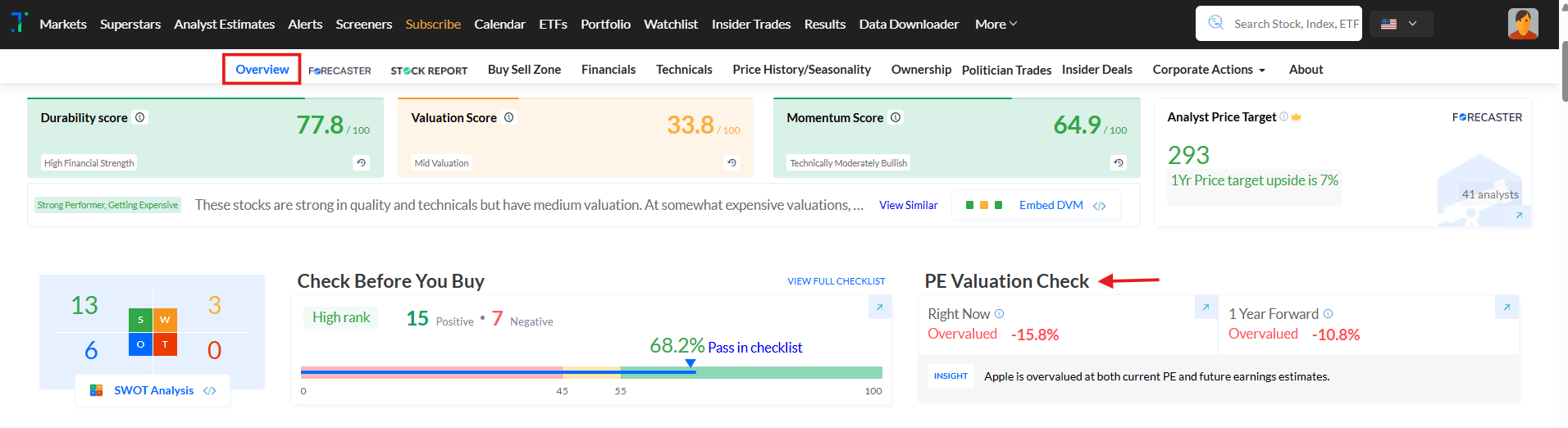
1. Current PE vs 5-Year Average PE – to see how the stock’s current price-to-earnings ratio stacks up against its historical average.
2. 1-Year Forward PE vs 5-Year Average PE – using projected earnings to gauge how the forward-looking valuation compares with long-term norms.
These checks help you determine if a stock is trading above or below its valuation range.
------------------------------------------------------------------------------------------------------------------------------------------
More screener enhancements!
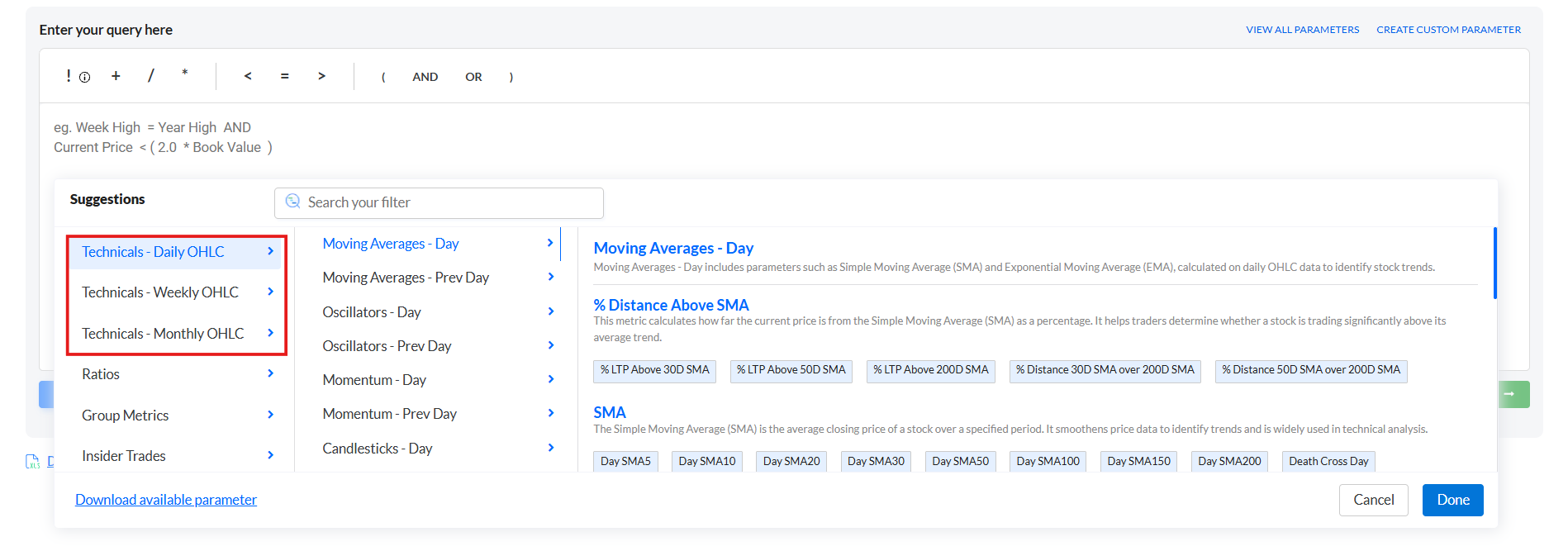
New Technical Parameters (Weekly OHLC & Monthly OHLC)
To help Trendlyne users make more informed decisions, we’ve added new parameters across SMA, EMA, oscillators, momentum, and candlesticks for weekly and monthly timeframes.
This addition to our custom screener parameters simplifies the analysis of price trends and the identification of key market signals, helping users navigate market volatility.
By utilizing these indicators, users can better assess the strength and direction of price movements, whether focused on long-term or short-term opportunities.
To test out these new parameters:
From the ‘Screeners’ page, navigate to ‘Create New Screener’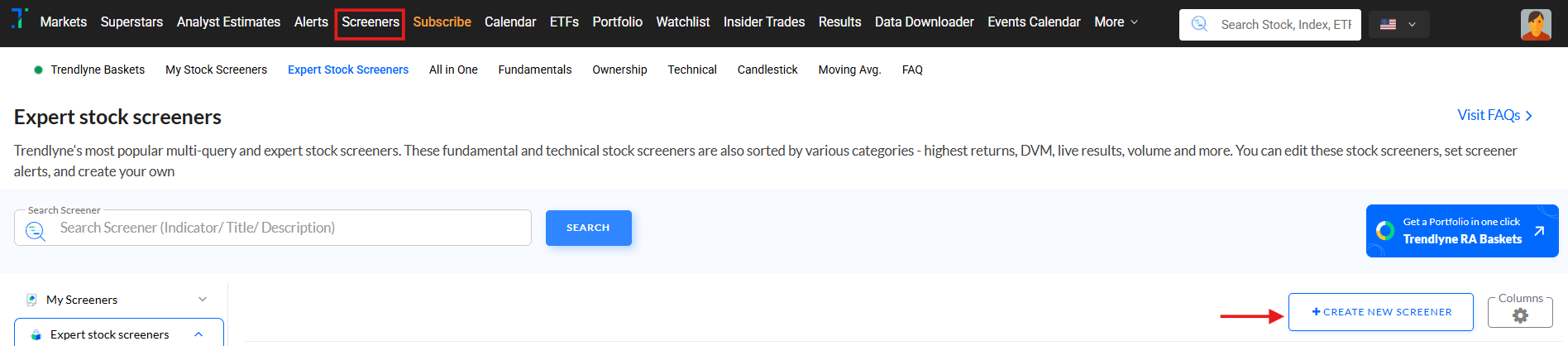
Click on ‘View All Parameters’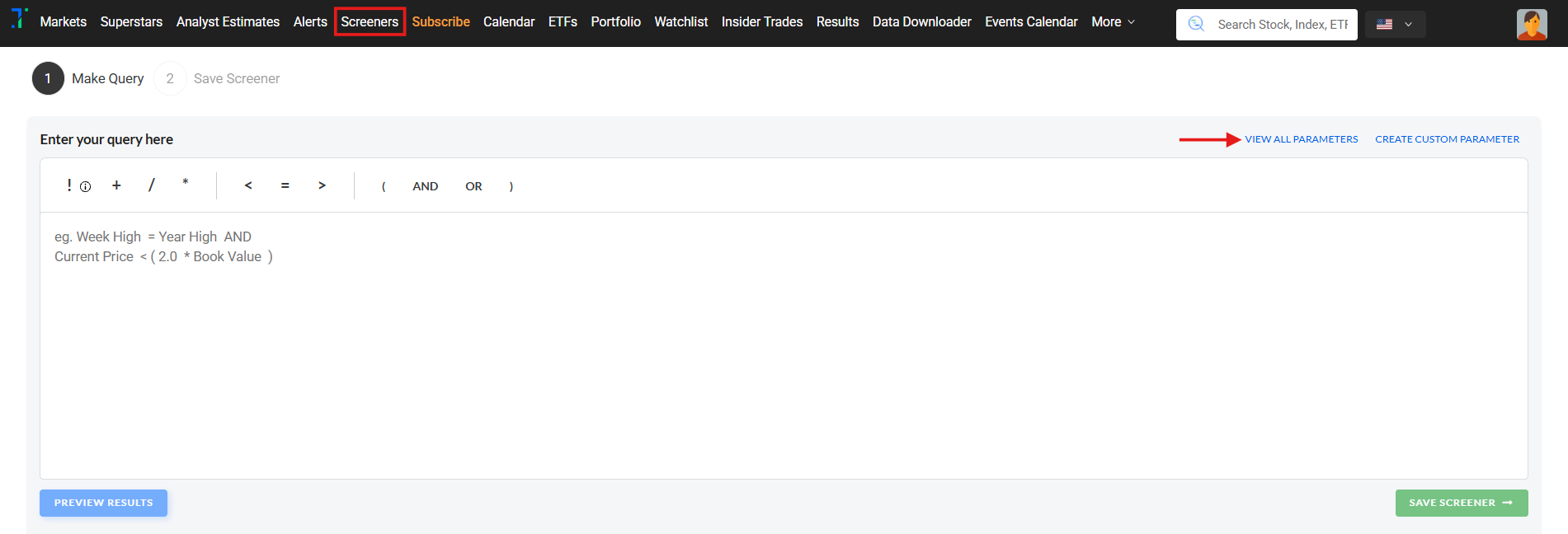
Scroll down to the ‘Suggestions’ drop-down until you come across ‘Technical - Daily OHLC’, ‘Technicals - Weekly OHLC’, and ‘Technicals - Monthly OHLC’.
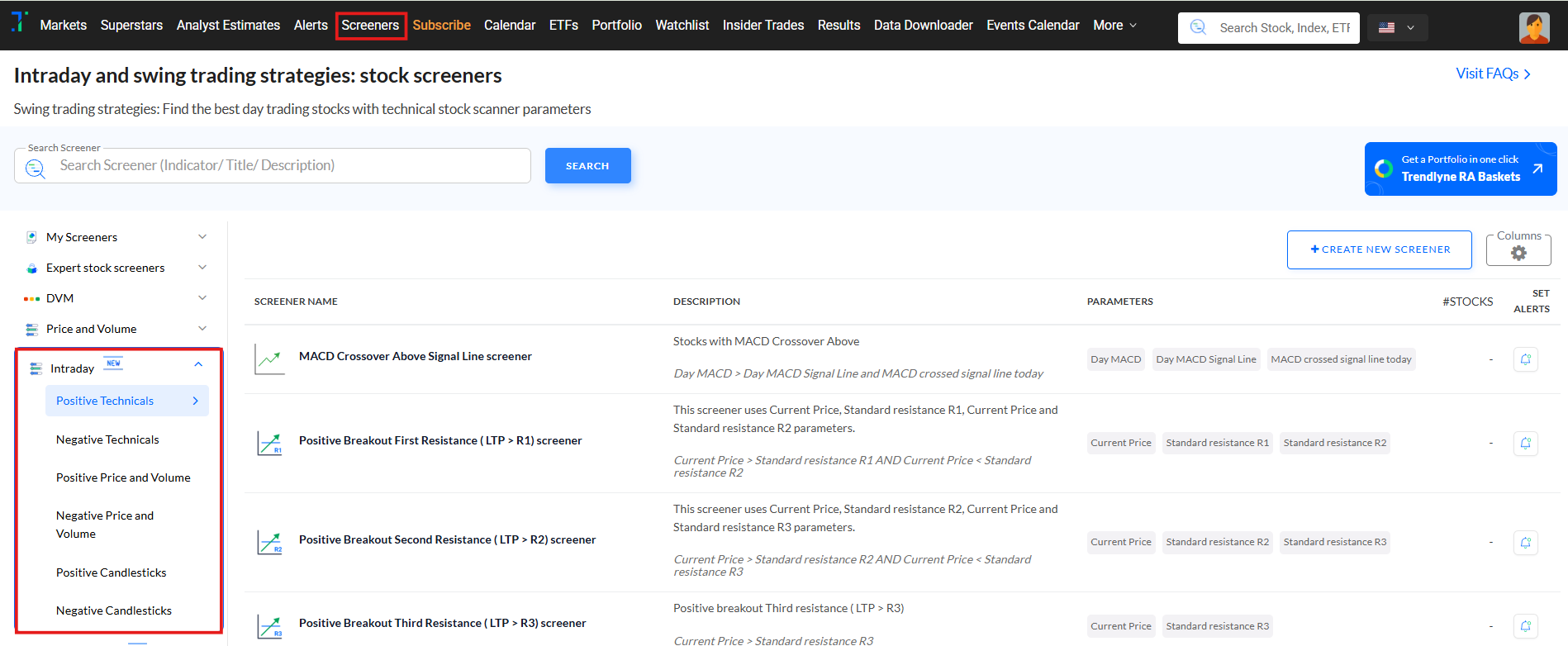
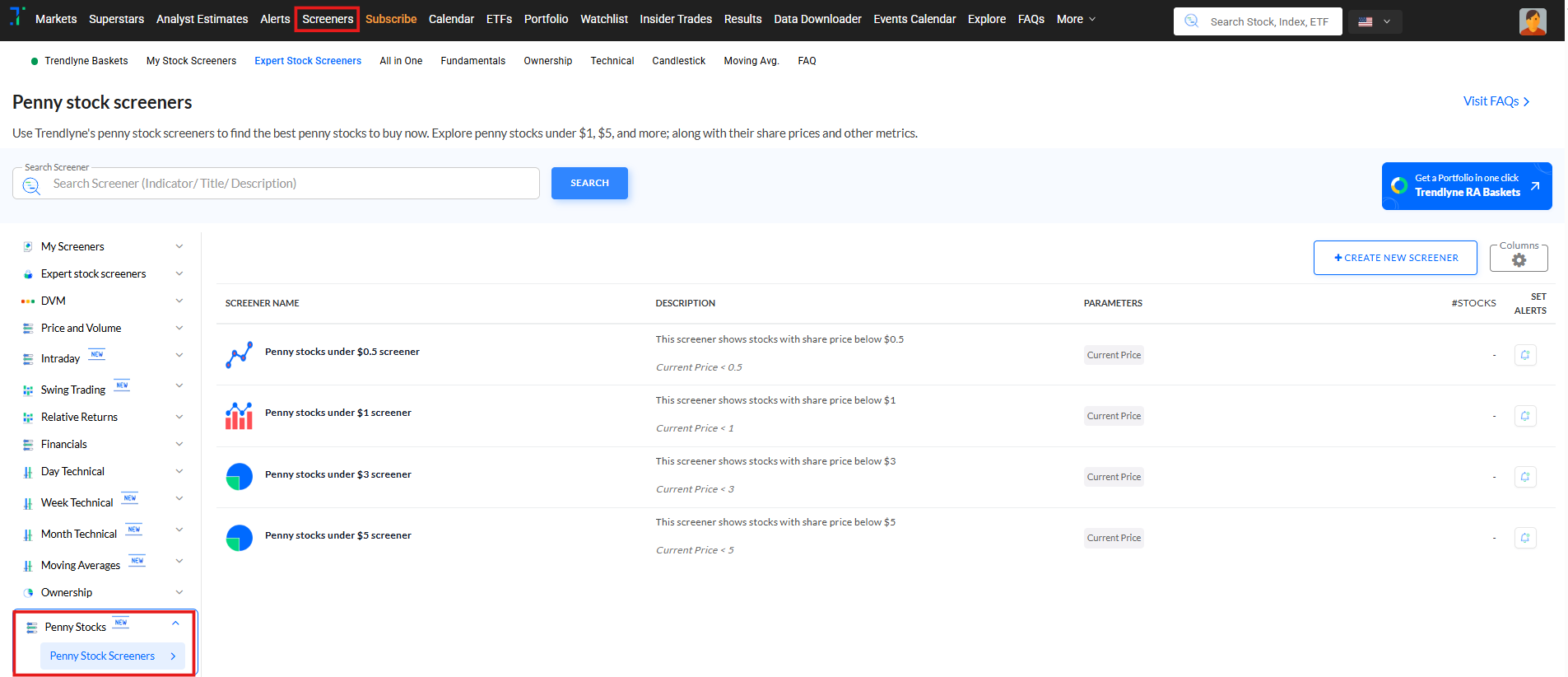
New screener categories: Intraday, Swing trading & Penny stocks
Intraday Screeners: Now track intraday moves with categories like Positive/Negative Technicals, Price and Volume breakouts, and Bullish/Bearish Candlestick patterns, all designed to catch short-term trends
Swing Trading Screeners: Find short- to medium-term trade setups with screeners based on Relative Returns, Price/Volume momentum, Candlestick patterns, and Technical signals.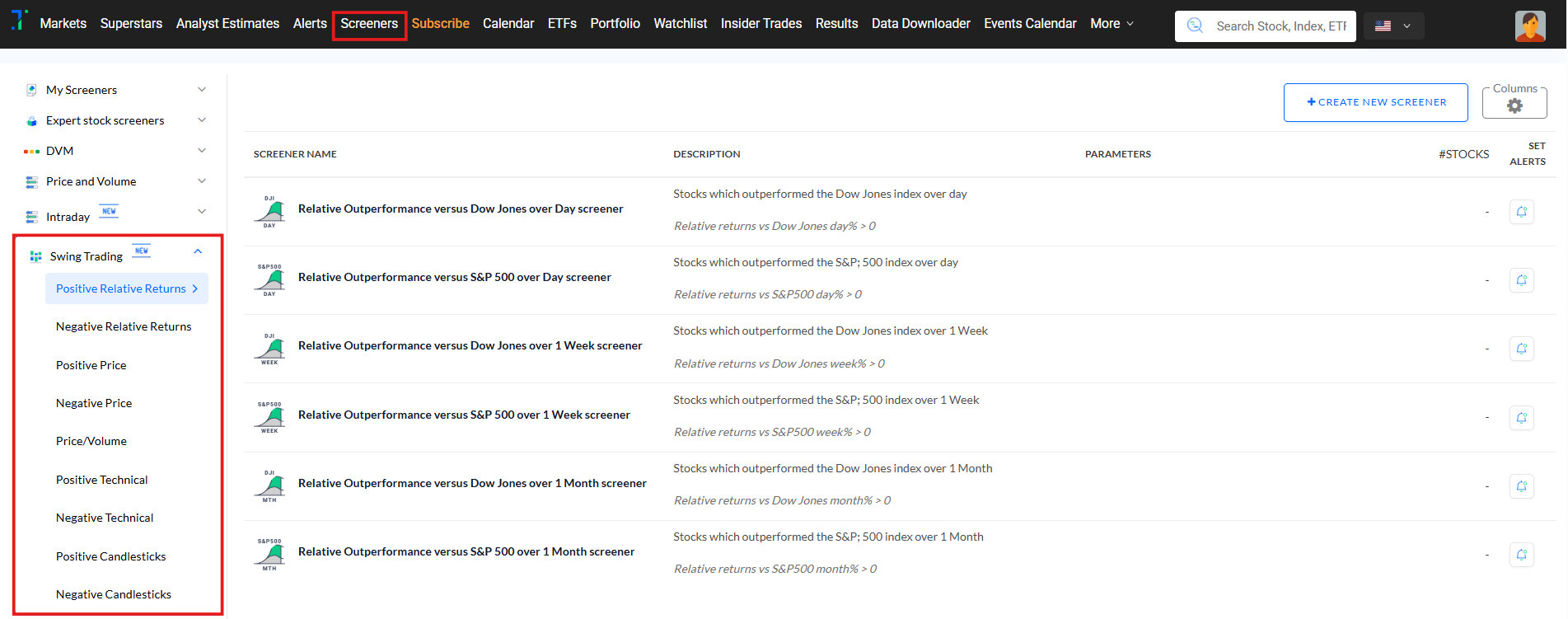
Penny Stock Screeners: Discover potential breakout stocks under $5 across all indices. A new, focused category to filter and track US’s penny stocks.
------------------------------------------------------------------------------------------------------------------------------------------
PE/ PEG alerts:
You can now set PE and PEG alerts along with Price alerts! Get instant email notifications when a stock’s valuation crosses your set thresholds. Spot overvalued or undervalued opportunities and make smarter, faster investment decisions.
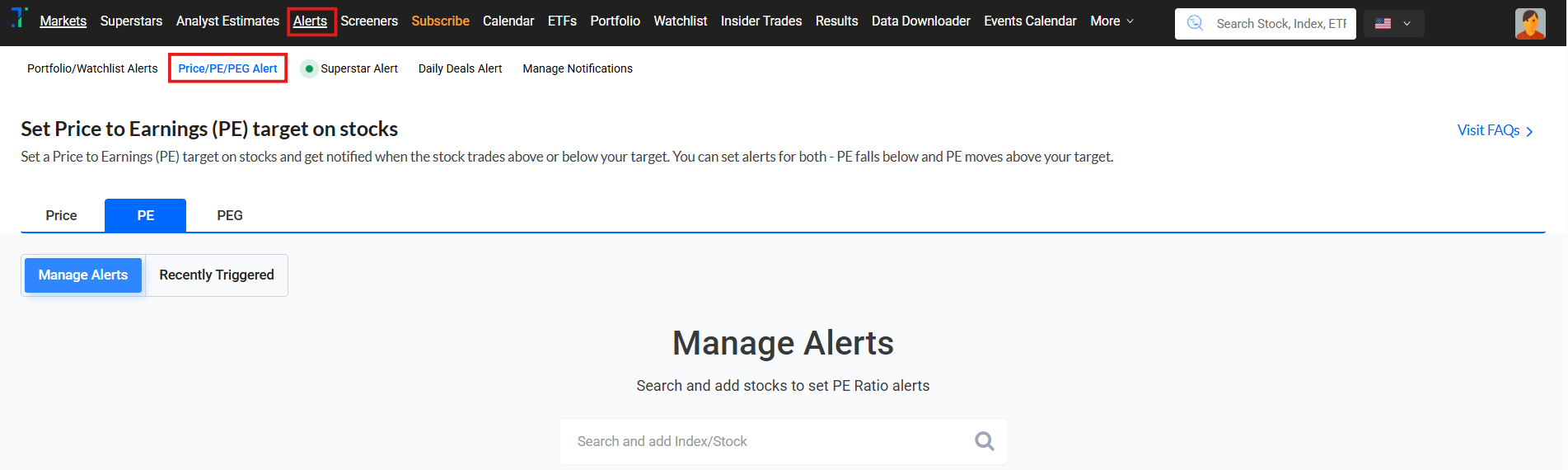

You can access the PE/ PEG alerts using the following links and from alert pop-up from Stock overview pages:
US: https://us.trendlyne.com/
India: https://trendlyne.com/alerts/
------------------------------------------------------------------------------------------------------------------------------------------
Trendlyne Excel Connect brings US financial data to Excel & Google sheets
Excel Connect is a product we are pretty excited about, because of how easy it makes stock analysis.
Excel Connect lets you access financial data for any listed stock, through an interactive Excel sheet or Google Sheet.

Fetch the Latest and Historical Financial Data into Excel
Getting the latest financial information into Excel is pretty easy. Simply open the sheet, grant the necessary permissions, follow the initial setup instructions. Once that is done you can select any stock, and the sheet loads up-to-date financial data.
Create Your Own Custom Formulas and Parameters
Now that you have this data, you can create your own parameters and formulas inside the Excel worksheet.
Sort, Filter, and Visualize Data
There are other ways you can power up your analysis with Excel Connect. You can easily add color coding, sorting, and visualizations such as charts and graphs.
And as you fetch new stock data, your formulas and rules automatically refresh, so your analysis is always up-to-date.
Excel Connect is available in the Data Downloader section. Please note that only ProPlus subscribers can generate tokens to access the latest data within the file.
------------------------------------------------------------------------------------------------------------------------------------------
New Portfolio Improvements:
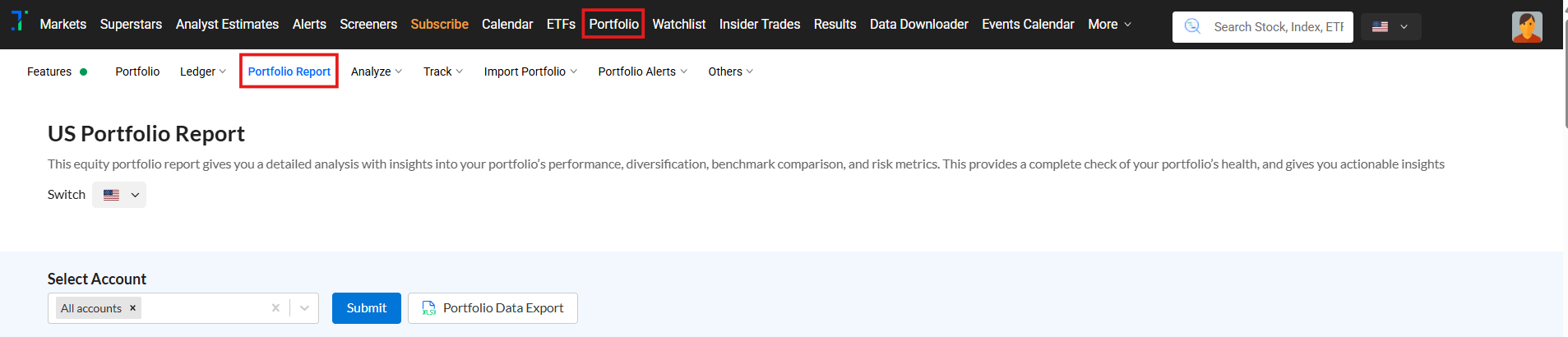
Fix portfolio problems early: Deep Dive launched in the Portfolio Report
The Deep Dive section of the Portfolio Report is very useful for finding hidden problems and red flags in your equity portfolio. It gives you a detailed analysis of each portfolio stock, helping you make more informed decisions with insights into important metrics, such as Stock Score, Valuation Ratios, and Risk Analysis.
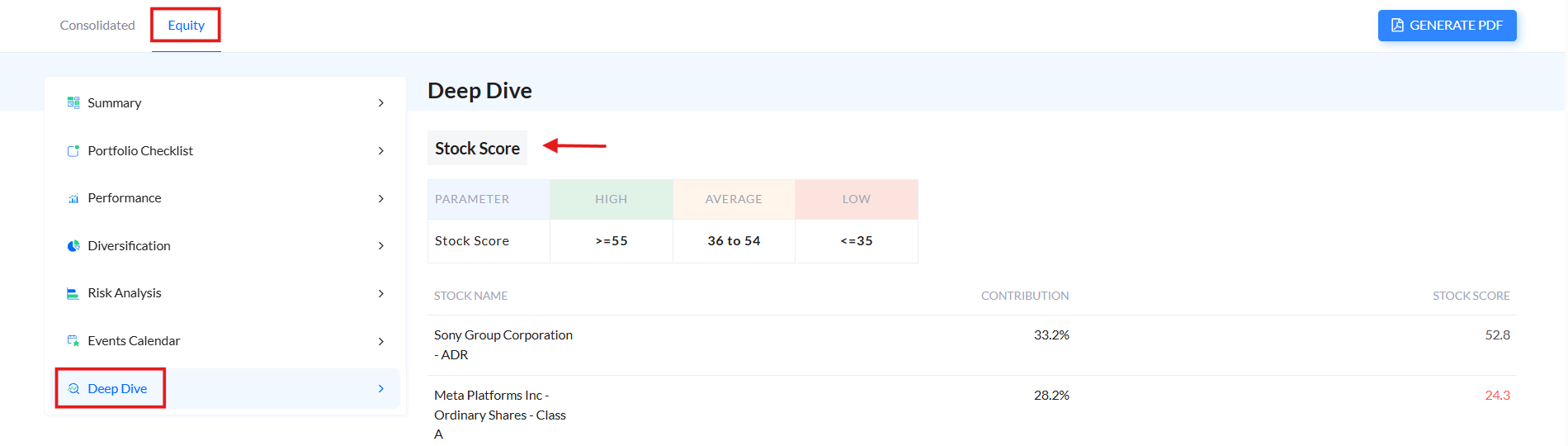
1.Stock Score: The Stock Score checks the performance of your portfolio stocks, calculated as a weighted average of individual Trendlyne stock scores.
Each stock’s individual score and its contribution to the portfolio score are displayed, making it clear which stocks contribute most to your portfolio's strength.
2.Valuation PE Ratios: This compares your portfolio's valuation with market benchmarks. It offers a breakdown of each stock's contribution percentage, Price-to-Earnings (PE) Ratio, and Price-to-Book (PB) Ratio.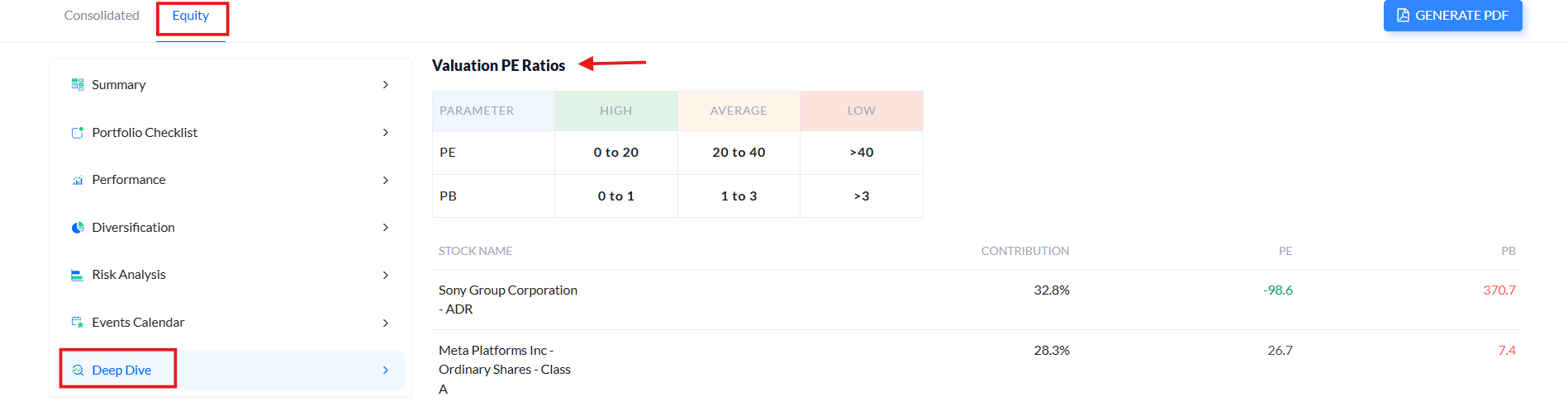
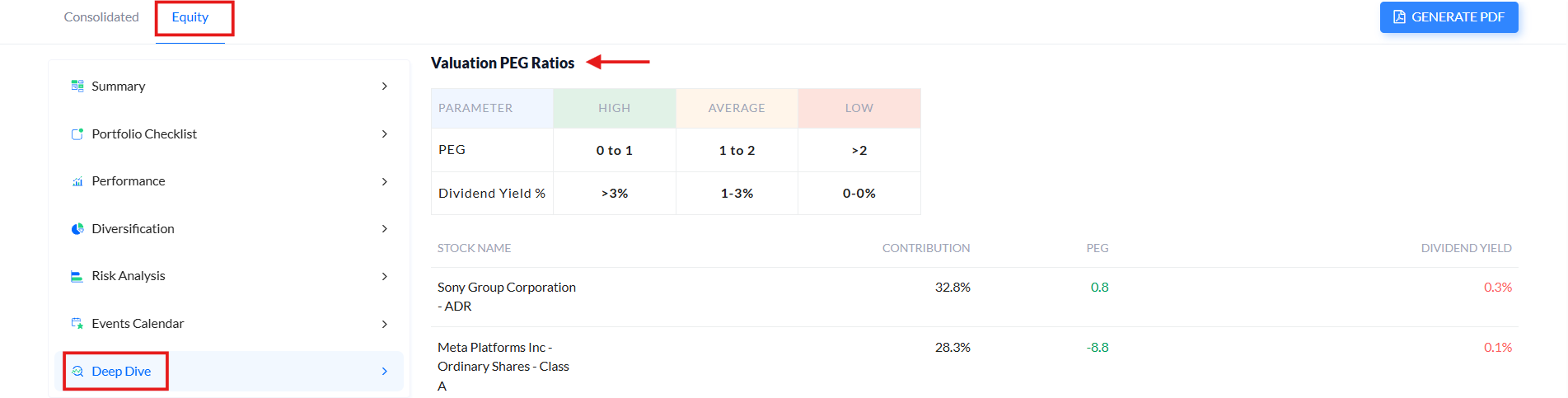
3.Valuation PEG Ratios: This metric compares your portfolio's PEG ratio to the Nifty 50 index, assessing valuation based on growth expectations.
Each stock's contribution percentage, PEG ratio, and Dividend Yield are here, with insights into growth potential relative to valuation, and income generated through dividends.
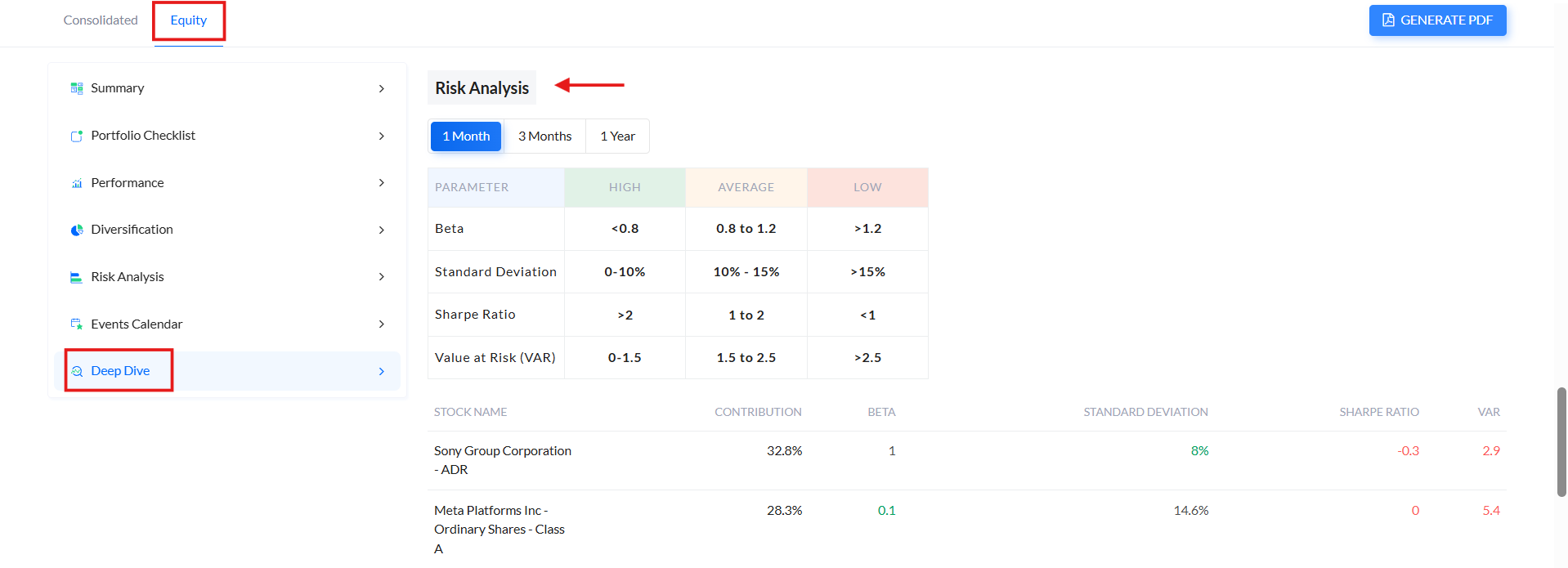
4.Risk Analysis: This measures your portfolio's volatility compared to the market. Detailed metrics, including each stock’s Beta, Standard Deviation, Sharpe Ratio, and Value at Risk (VaR), x-rays your portfolio volatility.
------------------------------------------------------------------------------------------------------------------------------------------
Investment and Financials Data Export in Portfolio:
We noticed that our users like our portfolio report tab. To make portfolio analysis even easier, we have introduced the Data Export feature.
With this feature, Trendlyne users can download an Excel sheet with detailed information about their equity portfolio including:
- Investment Details: This has financial metrics such as the sector and industry of your investments, the invested amounts, average buy price, stock quantity, current investment value, day change %, day P&L, and unrealized P&L.
- Fundamental Analysis: Includes metrics like Trendlyne DVM scores, Market cap, operating revenue growth %, PE ratio, Piotroski score, net profit growth %, Forecaster estimates, dividend yield %, etc.
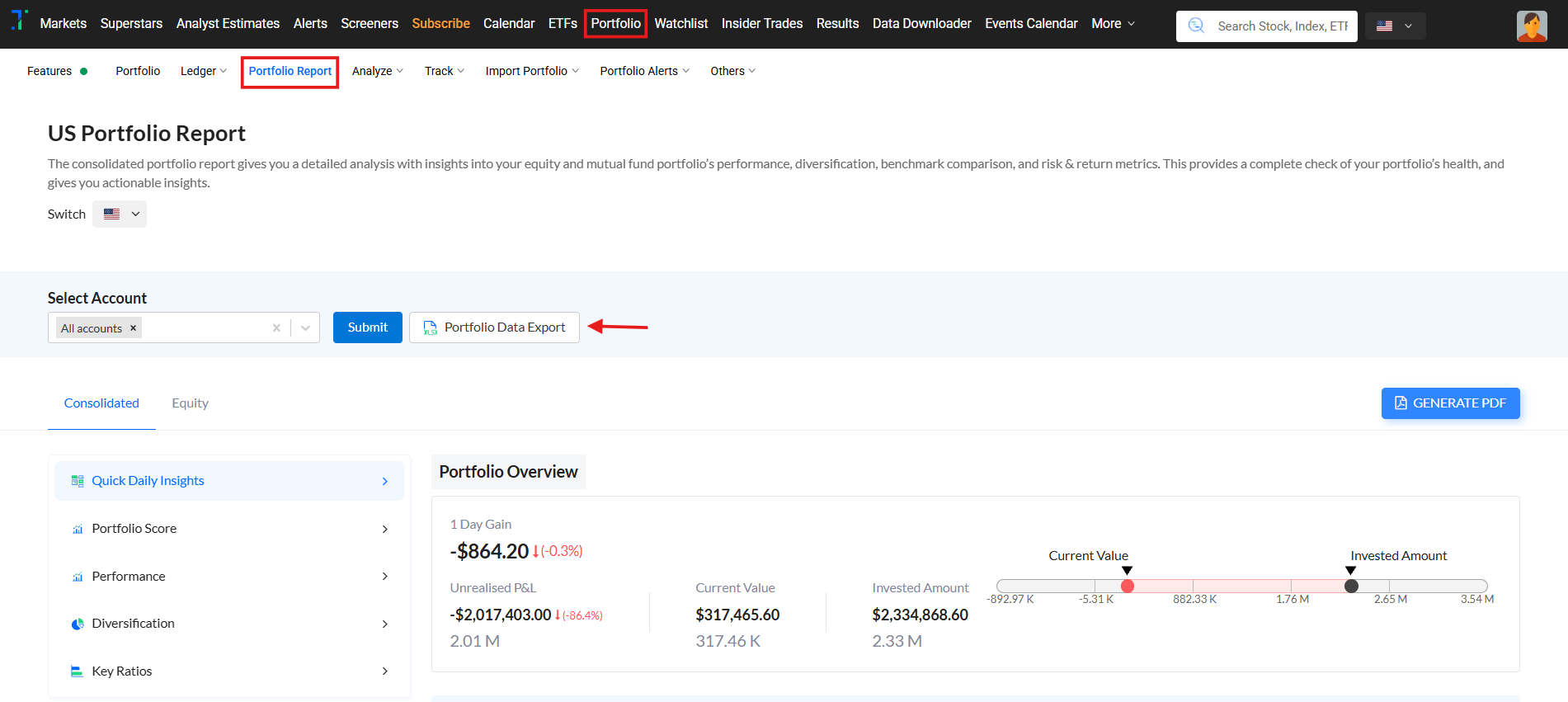
Go to the Portfolio Report section to get this report.
Then Click on ‘Portfolio Data Export’ and the file will automatically be saved to your downloads folder.
------------------------------------------------------------------------------------------------------------------------------------------
Portfolio Ledger:
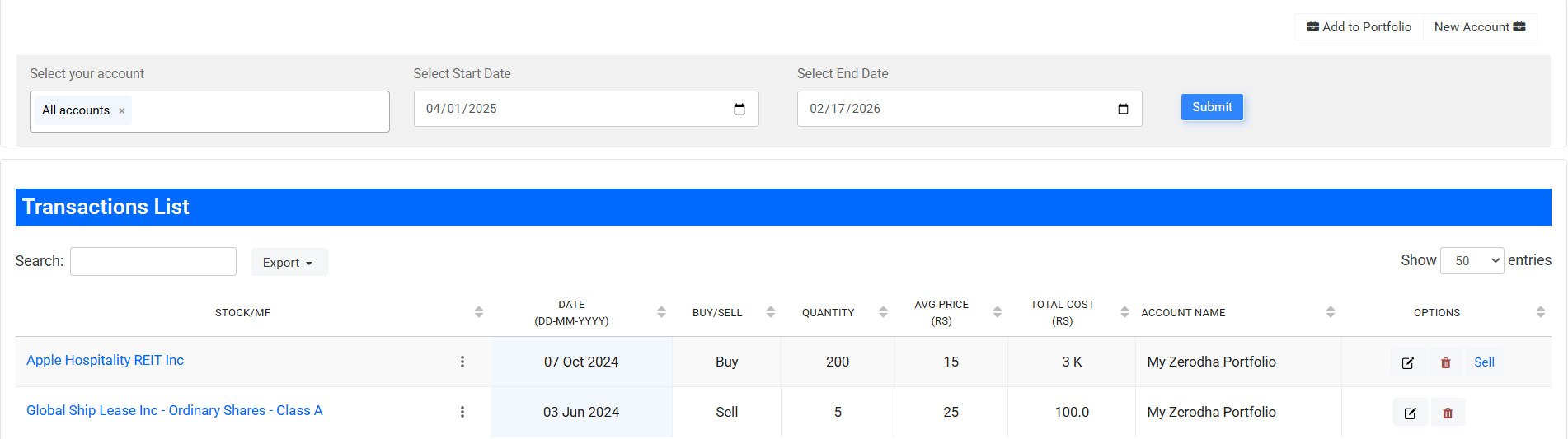
With Trendlyne’s new portfolio ledger, users can see all transactions across their demat accounts in one place. You can sort by transaction date, type, quantity, and price. This makes portfolio management easier, and gives you an organized view of your investment history.
To access this feature, click on ‘Ledger’ from the ‘Portfolio’ view:


------------------------------------------------------------------------------------------------------------------------------------------
6th June, 2024
Enhanced Data Downloader

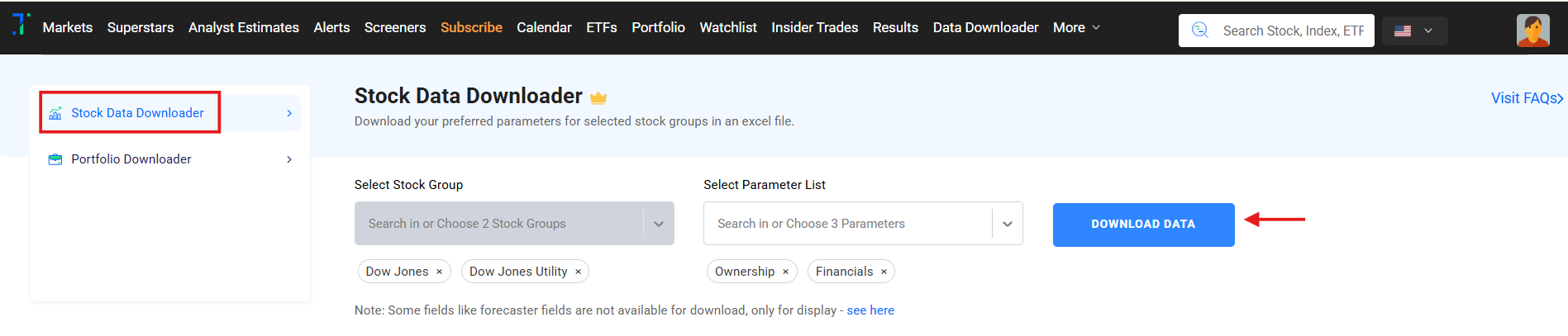
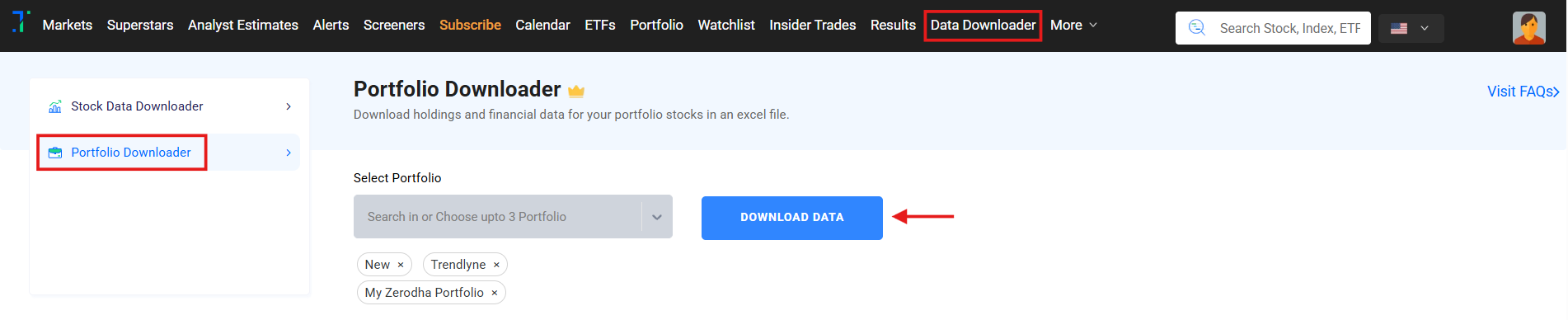
We have upgraded the 'Data Downloader' feature with a new look and feel. The Data Downloader now allows you to download data for reports from the Stock Data Downloader, and Portfolio Downloader from a single place.
After selecting the groups and your preferred metrics, click on 'Download Data' to download the file in Excel format.
In the Stock Data Downloader, you can select up to two stock groups or 1,000 stocks, and up to three metric lists or 90 characteristics at once. Click on 'Download Data' to get the file in Excel format.
In the Portfolio Downloader, you can download comprehensive holding details including Quantity, Buy Price, PnL, Trendlyne scores, Relative performance, financial data and more.
------------------------------------------------------------------------------------------------------------------------------------------
15th May, 2024
Woodie's, Camarilla, and Fibonacci Pivots
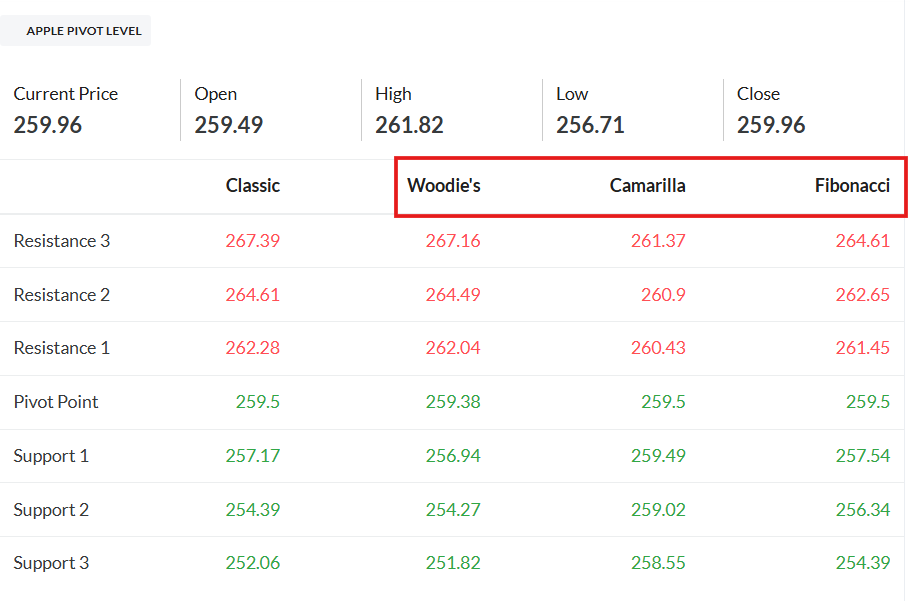
We have added Woodie's, Camarilla, and Fibonacci pivots to the Stock Technical section. These additional pivot points will help better understand potential price resistances and supports.
Woodie's Pivot Points: Calculated using the previous trading day's high, low, and close prices. The pivot point is the average of these values, with additional support and resistance levels derived from it.
Camarilla Pivot Points: Based on the previous trading range, these pivot points highlight important price levels within the range, helping to identify potential reversal or breakout points.
Fibonacci Pivot Points: Derived from Fibonacci retracement levels, these pivot points use Fibonacci ratios to identify potential support and resistance levels.
With these new additions, you can incorporate more pivot point strategies into your trading decisions.
Happy analyzing!
------------------------------------------------------------------------------------------------------------------------------------------
24th April, 2024.
‘TradingView’ charts for Trendlyne customers
Trendlyne has recently enhanced its offerings by integrating TradingView charts, one of the most widely-used, advanced charting tools in the financial market. This integration significantly upgrades Trendlyne's capabilities, providing users with sophisticated graphical analysis options and customizable features. TradingView charts are known for their extensive range of indicators and charting tools, which cater to both novice and professional traders.
With this integration, Trendlyne users can access detailed price graphs, perform trend analysis, create personalized trading strategies, and apply technical analysis tools across various chart types.
To access the TradingView chart, follow these steps:
Select any stock and navigate to the chart section.
Click on 'Switch to TradingView' to access the 'TradingView' charts
Default Chart